Premium
AI agent + human team
An AI agent that answers, acts, triages and hands off, on your own server
DChat is live chat with an AI agent built in. The AI answers visitors first from your own help articles, website and documents. It can look things up or change things in your systems through actions you define, with the approvals you choose. It labels and prioritises incoming conversations, and when a visitor needs a person it hands over with the conversation so far. Agents get a copilot in the reply box for suggested replies, summaries, rewriting and translation.
All of it runs inside the DChat server you install, against your own SQL Server database, and on the model you connect: a local Ollama server, or your own OpenAI or Anthropic key. With a local model, the AI's prompts and answers stay on your own infrastructure. The AI agent is part of Premium, at $19 per agent per month; live chat stays free with unlimited agents. This page describes the ASP.NET Core edition; the separate Web Forms package does not include it.
Answers from your knowledge
Help articles, a crawl of your website, PDF, Word and CSV files, with sources linked under each answer.
AI actions with approval
Look up an order or update a booking through your own endpoints, approved by an agent or confirmed by the visitor.
Visual bot flows
Scripted questions, conditions and handoffs with AI steps where they help. Flows are free; AI steps need Premium.
AI triage
Labels, sentiment, priority, language, department and team, applied or only suggested.
Handoff with context
The agent sees the bot conversation and any AI action notes, so the visitor does not repeat themselves.
Copilot for agents
Suggested replies, summaries, rewrite, tone, live translation and help-center drafts.
PremiumNew in 2.0.8
It answers first, from your own knowledge
The AI agent answers from your knowledge base articles, your own website and your documents, shows which pages each answer came from, can be tested before visitors see it, and reports how many conversations it actually resolved. When it cannot help, it offers a person.
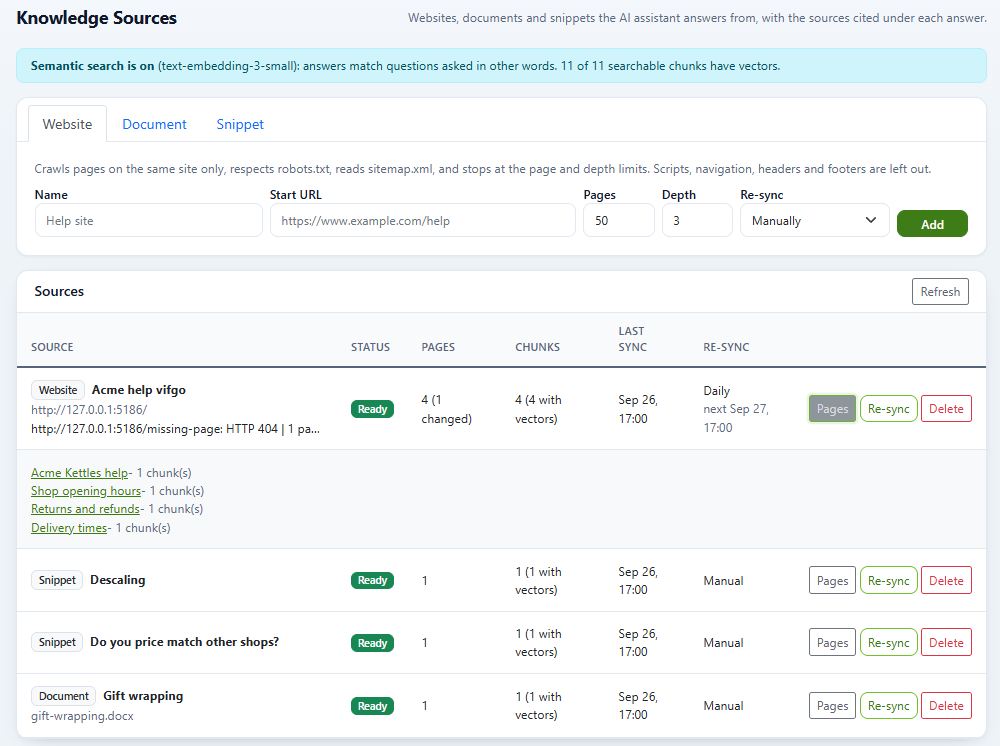
Knowledge sources
Add a website and DChat crawls it in the background: same site only, robots.txt respected, sitemap.xml read, within the page and depth limits you set (up to 500 pages). Upload PDF, Word (DOCX), CSV, text or Markdown files up to 10 MB, or type a snippet. Re-sync by hand, daily or weekly; only changed pages are indexed again. Answers combine keyword and meaning-based search and list their sources as links under the reply.
Meaning-based search needs an embeddings model from your provider: OpenAI or a local Ollama server. With Anthropic, or with embeddings switched off, the bot searches by keyword only. Crawls refuse private and internal addresses unless you allow them.
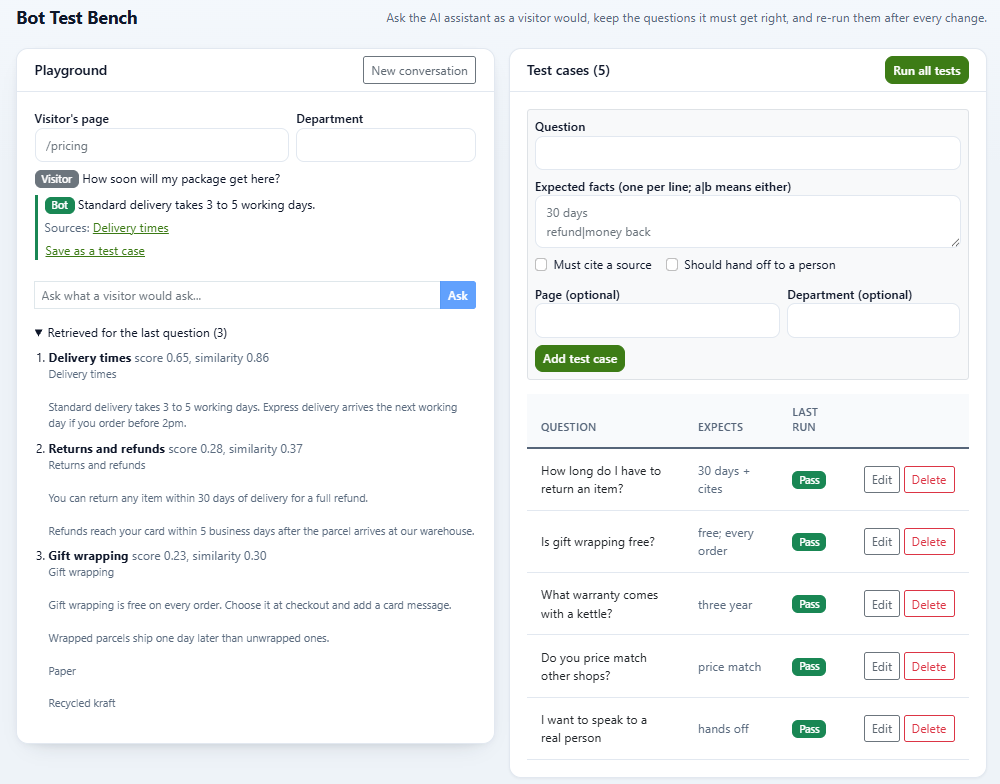
Bot test bench
Ask the bot what a visitor would ask, on a chosen page and department, and see the answer, its sources and the passages it retrieved. Save the questions it must get right as test cases with the facts the answer should contain, then run them all after every change. A failed case can become a new snippet in one click. Test questions are not counted as visitors.
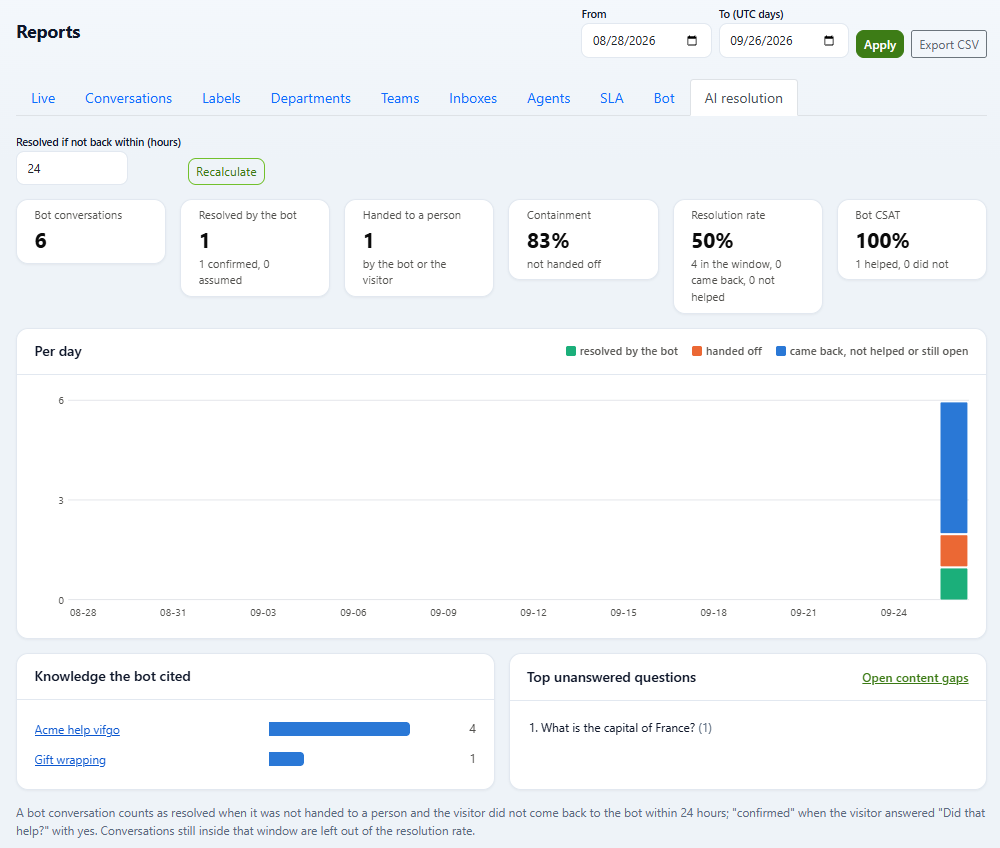
AI resolution metrics
Reports has an AI resolution tab: bot conversations, how many the bot resolved, how many went to a person, containment, resolution rate and bot satisfaction, per day, with the knowledge the bot cited most and the questions it could not answer. A conversation counts as resolved when the visitor did not ask for a person and did not come back within a window you choose; it is confirmed when the visitor answered “Did that help?” with yes. Export as CSV.
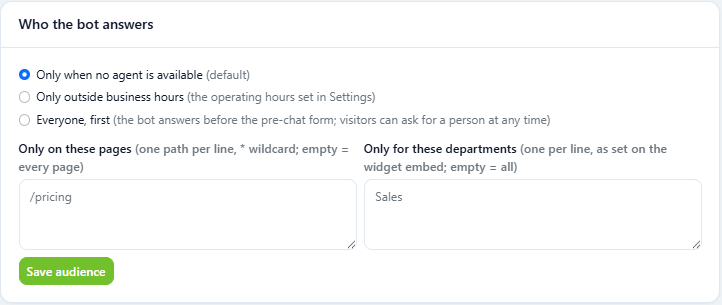
Who the bot answers
Let the AI chatbot answer only when no agent is available, only outside business hours, or first for everyone. Limit it to chosen pages and departments. After 20 bot replies in one conversation, the visitor goes to a person.
PremiumNew in 2.0.9
AI actions: it does the routine work, with the approvals you choose
An AI action is an HTTP call to one of your own systems that the AI agent can make while it talks to a visitor: look up an order by number and email, check stock, update a booking. You describe the endpoint and its inputs in the dashboard; the AI decides when the conversation calls for it.
- Typed inputs (text, number, email or a fixed list), checked before every call; anything off is refused and the AI is told why
- Three approval modes: run straight away, wait for an agent to approve, or ask the visitor to confirm with a button in the widget
- Actions that change things start out needing an agent's approval; read-only lookups can run straight away
- Only the response fields you list are passed back to the AI and the visitor
- A daily limit per action, a cap per conversation, private and local addresses refused, header secrets stored encrypted
- Inputs waiting for approval are kept encrypted and cleared once decided; every run is logged and covered by privacy export and erasure
AI actions need a model that supports tool calling. OpenAI and Anthropic models do, and so do many Ollama models; with a model that does not, the AI agent simply answers without them. AI actions grew out of the HTTP tools added in 2.0.6, which keep working.
FreeAI steps: PremiumNew in 2.0.9
Visual bot flows: scripted where it matters, AI where it helps
Some conversations should follow a fixed path: collect an order number, ask which product, route billing questions to the billing team. Bot flows let you draw that path and drop the AI in only where an open question needs it.
- Ten step types: message, question with buttons, typed input, condition, set labels and attributes, assign, handoff, AI answer, AI action and end
- A canvas where steps can be dragged, plus an outline view that works entirely from the keyboard
- Problems are listed and publishing is refused until they are fixed; each publish is a new version, and a visitor keeps the version they started with
- A simulator runs the unsaved draft with answers you type, and calls nothing
- Reach and drop-off counts per step for the published version
- At handoff, the fields, labels and department the flow collected go to the agent with the chat
Flows without AI steps are free on Community. The AI answer step needs the AI assistant and the AI action step needs AI actions, both in Premium; without Premium, an AI answer step hands the visitor to a person.
PremiumNew in 2.0.9
AI triage: the inbox sorted before an agent opens it
Add the AI classify action to an automation rule and the AI reads the conversation and proposes labels from a list you allow, a sentiment, a priority, the customer's language, and a department or team.
- Apply the result, or only suggest it in a private “AI triage” note for an agent to act on
- A confidence floor: anything the AI is unsure of is left alone
- It never overrides an agent: labels are only added, and a priority, department or team is only set where none is set yet
- Runs once per conversation per rule, in the background, within a daily AI allowance, and is recorded in the audit log
- Visitor text is fenced off as untrusted input, and only labels from your allowed list can be applied
- A sentiment card in Reports
AI triage is part of the AI assistant and runs through automation rules, both in Premium.
Premium
Handoff to a person, with the context
The visitor can ask for a person at any point, and the AI hands over by itself when it cannot help or when its provider is unavailable. The agent who picks up the chat sees the bot conversation and notes of any AI actions that ran, so the visitor does not have to start again. In 2.0.9 this also covers the “Talk to a human” button and handoffs from bot flows, which carry the fields and labels the flow collected.
Premium
Copilot: AI for the agents, not only for the bot
Agents get suggested replies and can rewrite a draft, fix its spelling, change its tone, translate it or summarise the conversation from the reply box. Conversations in another language can be translated as they arrive. The AI Copilot page proposes help-center articles from resolved conversations, lists the questions the bot could not answer and shows what the AI was used for.
Reply-box actions
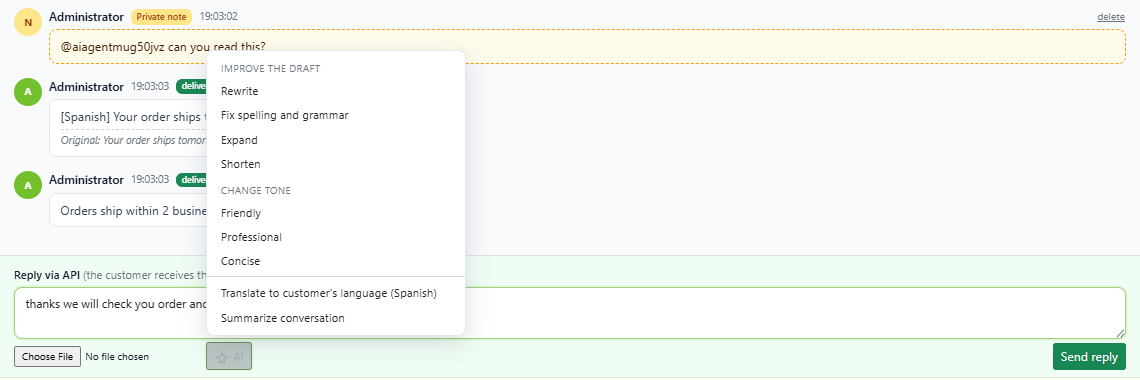
Rewrite, fix spelling and grammar, expand, shorten, make it friendly, professional or concise, translate into the customer's language, or summarise the conversation.
Live translation
Set or detect the customer's language, read their messages translated into yours, and optionally send your replies translated. The original is kept beside each one. 44 languages.
Help-center drafts
Propose question-and-answer articles from resolved conversations and from unanswered questions. A person reviews each one; nothing is published automatically.
In the reply box
The AI button works on what the agent has typed. The result replaces the draft for the agent to check, undo or send; nothing is sent without them. Each agent can make up to 20 AI requests a minute and 500 a day.
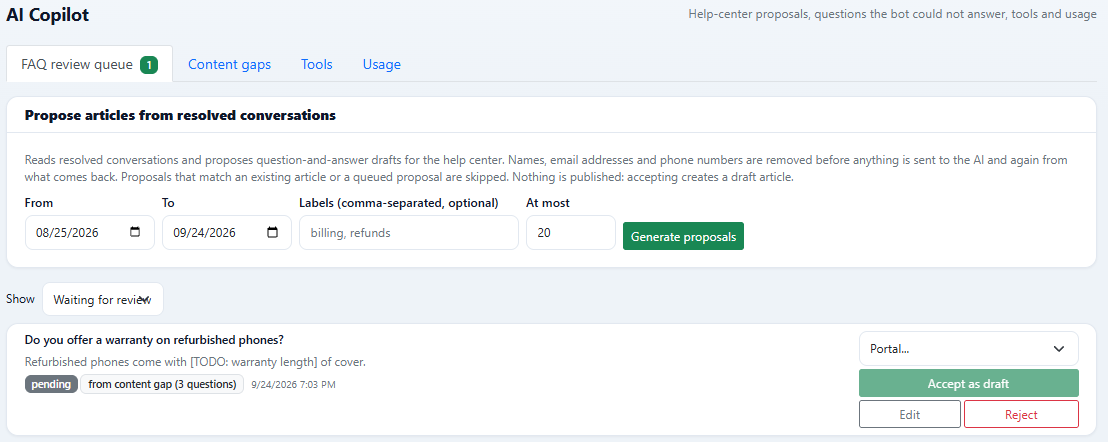
FAQ review queue
Pick a date range, optional labels and a maximum, and the AI reads resolved conversations and proposes articles. Names, email addresses and phone numbers are removed before anything is sent to the model, and again from what comes back. Proposals that match an existing article are skipped. Accepting one creates a draft article.
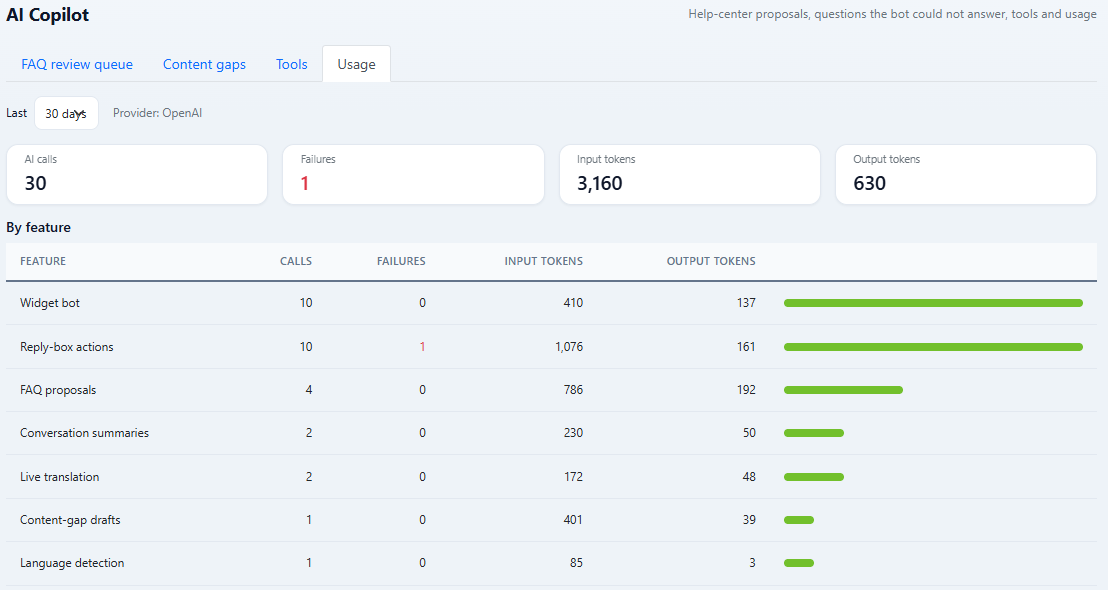
AI usage
Calls, failures and tokens by feature and by day, for the provider you use, so you can see what the AI is doing and what it costs you with that provider.
Included in Premium
- The AI chatbot with human handoff and the bot conversation attached
- Knowledge sources: website crawl, PDF, DOCX and CSV, scheduled re-sync
- Answers with cited sources, from keyword and meaning-based search
- Bot test bench with saved test cases
- AI resolution metrics and “Did that help?” in the widget
- AI actions with agent approval or visitor confirmation (2.0.9)
- AI answer and AI action steps in visual bot flows (2.0.9)
- AI triage: labels, sentiment, priority, language, department and team (2.0.9)
- Reply-box actions: rewrite, fix, expand, shorten, change tone
- Translate a reply and summarise a conversation
- Live translation of incoming and outgoing messages
- FAQ proposals from resolved conversations, with a review queue
- Content gaps: questions the bot could not answer, grouped
- Bot audience: when, on which pages and for which departments
- AI usage by feature and by day
- Ollama, OpenAI or Anthropic, with your own key
How it works
Content gaps
Questions visitors asked the AI assistant that it could not answer, said it did not know, or that ended with a handoff to a person are grouped by similarity. One click asks the AI to draft an article for the group, which goes to the review queue.
Calls to your systems
Arguments only ever go into the path, query or JSON body of a call, never the host. Private and local addresses are refused, header values are stored encrypted, answers are cut at 16 KB, and every call is logged. Up to 25 tools and actions, each with a test button.
Your model, your data
Conversation text goes only to the provider you configure. With a local Ollama model it never leaves your network.
If Premium lapses
The AI features switch off and live chat keeps running. Proposals, gaps, tools and action definitions stay stored and readable, and come back when you renew. Bot flows keep running; their AI answer steps hand visitors to a person.
Questions we get asked
Is the AI agent free?
No. The AI agent and AI Copilot are part of Premium, $19 per agent per month on the agents you choose. Live chat and everything else in the Community edition stays free with unlimited agents, and so do visual bot flows without AI steps.
Which AI models does it use?
The one you connect: a local Ollama server, or your own OpenAI or Anthropic API key. DChat does not charge per AI message; the provider bills you for its own usage, and a local Ollama model costs nothing per call.
Can the AI change things in our systems without a person?
Only if you allow it. Each AI action has an approval mode: run straight away, wait for an agent to approve it, or ask the visitor to confirm with a button. Actions that change things start out needing an agent's approval, each action has a daily limit, and every call is logged.
Do bot flows need Premium?
No. Flows built from messages, questions, inputs, conditions, labels, assignment and handoff are free on Community. Only the AI answer and AI action steps need Premium; without it, an AI answer step hands the visitor to a person.
Does AI publish anything to my help center by itself?
No. Proposed articles wait in a review queue. Accepting one creates a draft article, which a person edits and publishes.
An AI agent and a human team, on the model you choose
Premium is $19 per agent per month, billed only for the agents you choose to cover. Live chat stays free.